

AppFolio Integration & Partner Program
Approximate timeline from initiation to signed contract: 3+ months
There are two ways to integrate with AppFolio:
- Stack Marketplace (Paid Integration): Available to customers on Core & Plus subscription tiers. Includes listing in the AppFolio Stack marketplace. Vendors pay an annual fee and may be subject to revenue share.
- Database API (Free Integration): Requires AppFolio customers on Plus (read-only) or Max (read/write) plans. Vendors must be provisioned credentials directly by the client. This option does not include marketplace listing or partnership endorsement.
For the smoothest setup experience, you can work directly with AppFolio to request integration credentials without needing to mention third-party tools like Propexo. AppFolio will typically offer a direct integration via either Stack or their database API and provide the necessary credentials. This approach keeps the process straightforward and avoids any unnecessary back-and-forth about vendor relationships.
Pricing
Free option (Database API): Requires the mutual client to be on AppFolio’s Plus (read-only) or Max (read & write) plan. No approval required.
Paid option (Stack Marketplace): 50,000 annually, plus potential revenue share. Approval and mutual client required.
Stack Marketplace Integration (Paid)
Step 1: Submit Application
Apply through the AppFolio Stack partner form: https://www.appfolio.com/stack/partner-application
Step 2: Initial Review
The AppFolio partnerships team will review your application. Be sure to include detailed information about your product, target audience, and shared customer base.
Step 3: Security Compliance Questionnaire
Upon acceptance, you’ll be asked to complete a security compliance questionnaire outlining your technical and data security practices.
Step 4: Final Review & Contract
AppFolio will complete a final review. Once approved, you’ll receive and sign the official terms of service.
Database API Integration (Free)
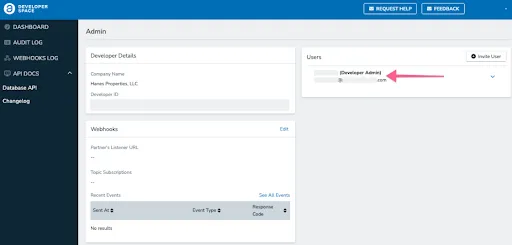
Step 1: Developer Space Setup (Client Action Required)
Your mutual AppFolio client must create a new user in Developer Space and assign it the “Developer Admin” role for your team.
Step 2: Credential Provisioning
The AppFolio client must retrieve and share the following credentials with your team:
- Developer ID
- Client ID (Available in Developer Space > Dashboard > Access Credential Management)
- Client Secret (Generated in the same location)
Step 3: Begin Development
Once credentials are received, you can begin accessing the AppFolio Database API using the appropriate endpoints. This API offers:
- Read-only access for Plus clients
- Read/write access for Max clients
Note: Database API integrations are not certified or listed by AppFolio and do not require partnership approval.